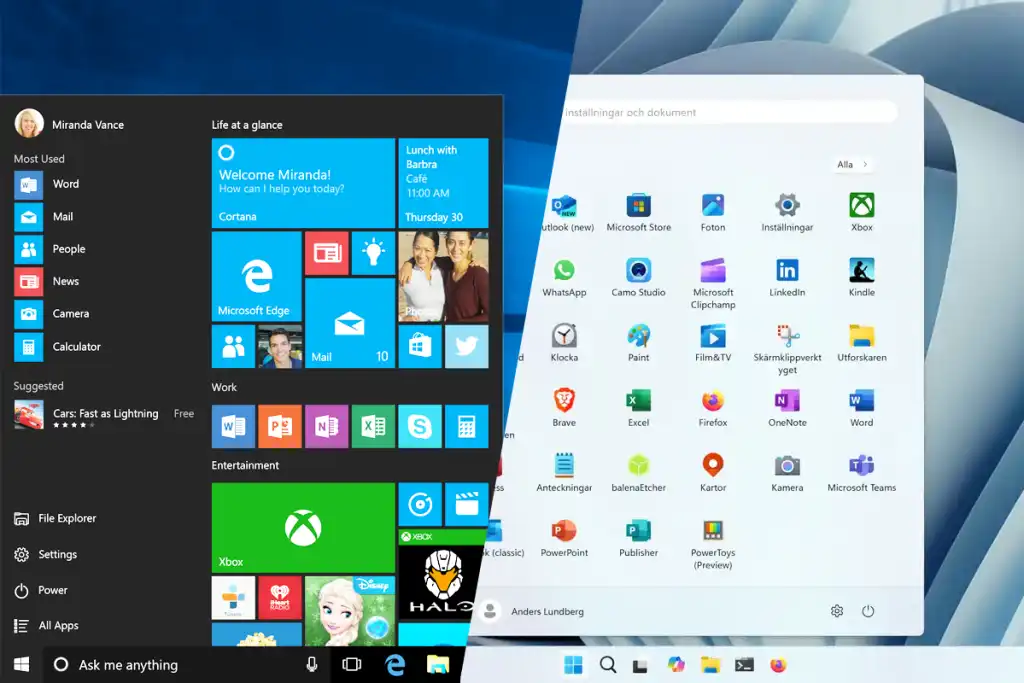
As Microsoft gradually phases out Windows 10 ahead of its 2025 end-of-support deadline, millions of users are finding themselves navigating the unfamiliar terrain of Windows 11 — a system that promises modernization and security but demands adaptation.
For long-time Windows 10 users, the switch can be disorienting. From a redesigned interface to stricter hardware requirements, Windows 11 marks a major shift in how users interact with their PCs.
Microsoft’s newest operating system, launched globally in 2021, was built to deliver a cleaner look, stronger security features, and deeper integration with cloud and AI technologies. Yet, for many users, the transition feels like learning a new language — one with the same alphabet but unfamiliar rules.
One of the most striking changes is the repositioned Start Menu and Taskbar, now centered by default. Gone are the dynamic live tiles that defined Windows 10. In their place is a simplified grid of pinned and recommended apps. For users who prefer the traditional layout, the Start Menu can still be moved back to the left through the settings menu.
Hardware compatibility has also become a major talking point. Windows 11 requires modern security technologies such as Trusted Platform Module (TPM) 2.0 and Secure Boot, leaving many older devices unable to upgrade officially. While Microsoft insists the move is necessary to safeguard users in an era of rising cyber threats, critics argue that it renders millions of otherwise functional PCs obsolete.
Beyond aesthetics and hardware, Windows 11 introduces new productivity features such as Snap Layouts for multitasking, Virtual Desktops with customizable backgrounds, and a Widgets panel for personalized news and weather updates. The redesigned File Explorer and the revamped Settings app also signal Microsoft’s effort to streamline user experience, even if it means temporarily confusing seasoned users.
Microsoft has integrated Microsoft Teams Chat directly into the taskbar to encourage collaboration and connectivity, while the Microsoft Store has been overhauled to support more app types, including Android apps through the Windows Subsystem for Android — a long-awaited feature for mobile developers and enthusiasts alike.
Gamers have also been prioritized in this upgrade. With features like Auto HDR, DirectStorage, and enhanced Xbox integration, Windows 11 aims to deliver faster load times and more immersive graphics on supported systems.
According to Microsoft, Windows 11’s design overhaul represents the company’s vision of a “simpler, safer, and smarter” computing future — one that reflects the hybrid realities of modern work and entertainment.
However, users still have time to adjust. Microsoft has confirmed that Windows 10 will continue receiving updates until October 14, 2025, giving individuals and organizations an extended window to prepare for full migration.
For now, Windows 11 remains both a challenge and an opportunity — a system designed to evolve with technology, even as it leaves behind some of the comfort zones of the past.
As one industry analyst put it, “Windows 11 isn’t just an upgrade — it’s a reset. It asks users to rethink how they work, play, and connect in a digital world that’s moving faster than ever.”

Leave a Reply